


Table of Contents
What Is ERP? A Practical, No-Fluff Guide to Enterprise Resource Planning (2026)
When people ask what ERP is, they’re usually trying to solve a real problem: too many tools, too much manual work, and no single place to see what’s actually happening in the business. If that sounds familiar, you’re already close to the answer.
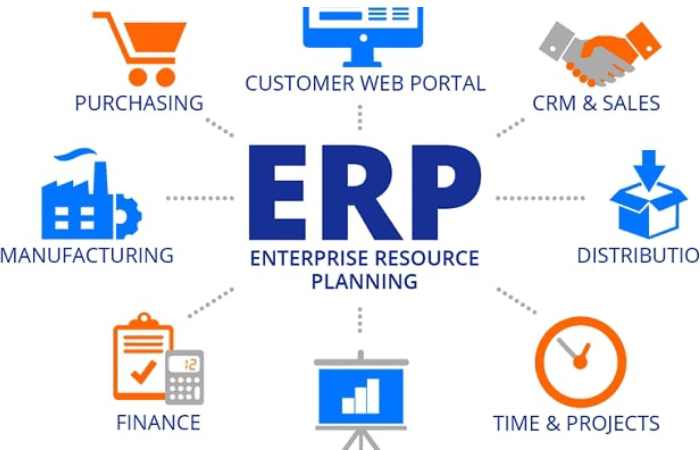
Enterprise Resource Planning (ERP) is software that connects your core business functions—finance, sales, inventory, HR, operations—into one shared system. Instead of jumping between apps and spreadsheets, your team works from the same data, in real time.
This guide explains how ERP works in plain English, where it fits, what it costs, and how to decide if it’s right for you—without the buzzwords.
ERP in One Minute
- What it does: Unifies key business processes in a single platform
- Why it matters: Fewer errors, faster decisions, clearer visibility
- Who uses it: From growing startups to large enterprises
- How it’s delivered: Cloud (most common), on-premise, or hybrid
If you’ve ever had to reconcile mismatched reports from different teams, you’ll understand the value immediately.
How ERP Actually Works (Behind the Scenes)
At its core, an ERP system is a shared database with modular apps on top.
- A sales order is created
- Inventory updates automatically
- Finance records the transaction
- Shipping gets notified
- Reports update in real time
No duplicate entries. No “which file is the latest?” confusion. Everyone sees the same truth.
The Building Blocks: Core ERP Modules
Most platforms are made of modules you can turn on as you need them:
1) Finance & Accounting
- General ledger, payables/receivables
- Cash flow, budgeting, compliance
- Real-time financial reporting
2) Sales & Customer Management
- Quotes, orders, invoicing
- Customer records and history
- Basic CRM features or deep integrations
3) Inventory & Warehouse
- Stock levels across locations
- Reorder points and demand signals
- Barcode/RFID support (in many systems)
4) Procurement
- Vendor management
- Purchase orders and approvals
- Cost tracking
5) Manufacturing (if applicable)
- Bills of materials (BOM)
- Production planning
- Quality control
6) Human Resources
- Employee records
- Payroll (sometimes integrated)
- Leave, attendance, onboarding
You don’t have to implement everything on day one. Good systems let you start small and expand.
Why Companies Move to ERP (Real Reasons, Not Marketing)
A. One Source of Truth
When finance, sales, and operations share the same data, meetings shift from arguing about numbers to making decisions.
B. Fewer Manual Tasks
Automations replace repetitive work—posting entries, updating stock, sending invoices.
C. Faster Decisions
Dashboards update instantly. You can spot issues (cash gaps, stockouts, delays) early.
D. Better Customer Experience
Accurate stock, faster order processing, and fewer mistakes improve delivery and support.
E. Scales With Growth
What worked with 5 people breaks at 50. ERP brings structure without adding chaos.
When an ERP System Starts Making Sense
You don’t need it on day one. But these signs usually mean it’s time:
- You maintain multiple spreadsheets for the same data
- Teams use separate tools that don’t talk to each other
- Reporting takes days instead of minutes
- Inventory numbers don’t match reality
- You’re hiring just to keep up with manual work
If two or more of these are true, you’ll likely see a quick payoff from a unified system.
Types of ERP (And Which One to Choose)
Cloud ERP (Most Popular)
- Access from anywhere
- Subscription pricing
- Vendor handles updates and security
Best for: Most small and mid-sized businesses
On-Premise
- Installed on your own servers
- Full control, higher maintenance
Best for: Strict data/control requirements
Hybrid
- Mix of cloud + on-premise
Best for: Gradual transitions or specific compliance needs
Reality check: For most companies in 2026, cloud-first is the simplest and fastest route.
What It Costs (Straight Talk)
Costs vary widely, but here’s a practical breakdown:
Upfront
- Setup/implementation: $5,000 – $100,000+ (depends on size/complexity)
Ongoing
- Subscription: $20 – $150 per user/month (typical cloud range)
- Add-ons (advanced modules, integrations)
Hidden Costs to Watch
- Data migration
- Customization
- Training time
- Process changes
A common mistake is underestimating implementation effort. Budget for time and training, not just software.
Implementation: What the Process Really Looks Like
- Discovery – Map your current processes (what’s broken, what to keep)
- Selection – Choose a system that fits your workflows, not the other way around
- Configuration – Set up modules, roles, approvals
- Data Migration – Clean and import existing data
- Training – Hands-on sessions for each team
- Go-Live – Start with core modules; stabilize
- Optimize – Add modules and automation over time
Expect 8–16 weeks for a typical SMB rollout, longer for complex setups.
Common Pitfalls (and How to Avoid Them)
1) Over-Customization
Custom code can slow you down later. Start with standard workflows unless there’s a clear ROI.
2) Poor Data Quality
Garbage in, garbage out. Clean your data before migration.
3) Skipping Training
Even the best system fails if people don’t know how to use it.
4) Big-Bang Rollouts
Trying to do everything at once increases risk. Phase it.
5) Choosing Based on Features Alone
Fit and usability matter more than a long feature list.
ERP vs. CRM (Quick Clarity)
| Area | ERP | CRM |
|---|---|---|
| Focus | Internal operations | Customer relationships |
| Core Use | Finance, inventory, HR | Sales, marketing, support |
| Data | Company-wide | Customer-facing |
| Relationship | ERP may include basic CRM | Often integrates with ERP |
In many setups, both work together.
Real-World Example
A mid-size retail business was using:
- One tool for sales
- Spreadsheets for stock
- Separate accounting software
Problems:
- Stockouts despite “available” items
- Delayed financial reports
- Manual reconciliation every week
After moving to a unified system:
- Inventory synced with orders in real time
- Finance reports generated instantly
- Fewer returns due to wrong stock levels
No magic—just connected data.
Popular ERP Platforms (Shortlist)
- SAP Business One / S/4HANA – robust, widely used
- Oracle NetSuite – strong cloud option for growing firms
- Microsoft Dynamics 365 – good ecosystem with Microsoft tools
- Odoo – modular, flexible, popular with SMBs
- Zoho ERP (via apps suite) – cost-effective for smaller teams
The “best” option depends on your processes, budget, and team size.
Is ERP Right for Small Businesses?
It can be—especially today.
Good fit if:
- You’re growing fast
- You manage inventory or multiple departments
- You need reliable reporting
Wait if:
- Your operations are very simple
- You’re still validating your business model
Many startups begin with lighter tools and graduate to ERP as complexity increases.
Trends Shaping ERP in 2026
- AI-assisted insights (forecasting, anomaly detection)
- Automation-first workflows (less manual entry)
- Mobile access for approvals and dashboards
- Composable systems (plug-and-play modules)
- Deeper integrations with eCommerce, payments, and logistics
The direction is clear: simpler interfaces, smarter data, less manual work.
Quick Checklist Before You Decide
- Do we have a clear process for each department?
- What reports do we need weekly/monthly?
- Which tasks are still manual?
- What integrations are must-have?
- Who will own the system internally?
If you can answer these, you’re ready to evaluate options seriously.
Key Takeaways
- ERP connects your business processes into one system
- It reduces manual work and improves visibility
- Cloud solutions are the default choice for most teams
- Success depends as much on implementation and training as the software itself
- Start with core modules, then expand
Final Thoughts
You don’t adopt ERP because it’s trendy—you do it because your current setup is slowing you down. When your data is scattered, decisions get delayed and mistakes creep in.
A well-implemented ERP system won’t just organize your operations—it will change how your team works. Fewer silos, clearer numbers, faster decisions.
If your business is hitting that point where spreadsheets and disconnected apps are holding you back, moving to a unified platform is less about “upgrading software” and more about building a system that can scale with you.