

What Is Process Mapping? A Guide to Process Mapping with Examples and How It’s Used in Business (2026)
Have you ever been in a situation where everything in your team is too complicated, repetitive tasks abound, people are confused about their responsibilities, and things go wrong for no apparent reason?
Well, this is exactly the type of situation where process mapping becomes helpful.
This does not mean that process mapping is some kind of abstract theory that has no use in practice, but rather an actual tool to learn the way things are really being done and, even more, how this process can be improved.
In this article, we’ll show you how to understand process mapping in a practical, business-oriented way.
What Is Process Mapping (Explained Simply)
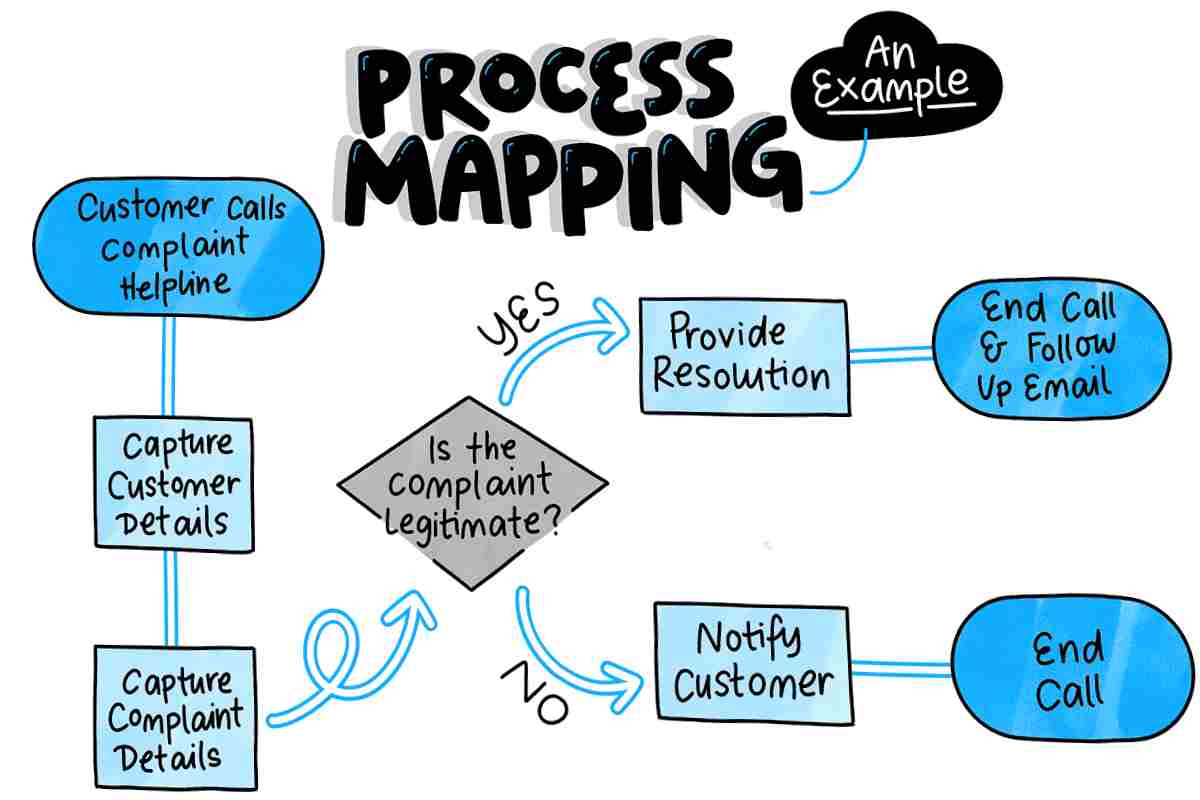
Process mapping is a technique for visually representing the sequence of events during the completion of workflow process. Instead of using written description to describe each of the tasks, process mapping uses diagrams to represent each step of a process.
When a project includes several dependent activities, identifying the tasks that directly affect the completion date is also important. Understanding the critical path in project planning helps project teams identify tasks that cannot be delayed without affecting the overall project timeline. This makes it easier to plan resources and keep important project activities on schedule.
Simply put,
It depicts:
The actions that take place
The people involved
The time at which actions occur
All the connections between actions
Process mapping can be considered as a blueprint of the flow of work process within an organization.
Importance of Process Mapping in Real Work Environment
Most companies do not have a clear understanding of the processes carried out in their organization. They rely on:
Verbal descriptions
Assumptions
Habits of individuals
This causes inefficiency.
What It Fixes in Practice
- Confusion about responsibilities
- Duplicate or unnecessary work
- Bottlenecks in workflows
- Poor communication between teams
Process Mapping Methodology (Detailed Process)
Process mapping is based on a straightforward, yet effective, approach.
Step 1: Determine a Process
Choose a certain business process, for example:
- Customer onboarding
Order processing
The hiring process
For larger projects, clearly defining what the process should cover can prevent confusion later. Establishing a project scope definition helps teams understand the boundaries, goals, and responsibilities involved before mapping each step.
Step 2: Write All Steps Involved
Write down all actions involved in this process from start to finish.
Step 3: Determine Responsibilities
Determine who performs each action involved in this process. Processes evolve, and maps should too. Businesses should also consider what could happen if an unexpected problem interrupts a workflow. Having a contingency plan can help teams respond more effectively when normal processes cannot continue as expected.
Step 4: Draw a Diagram
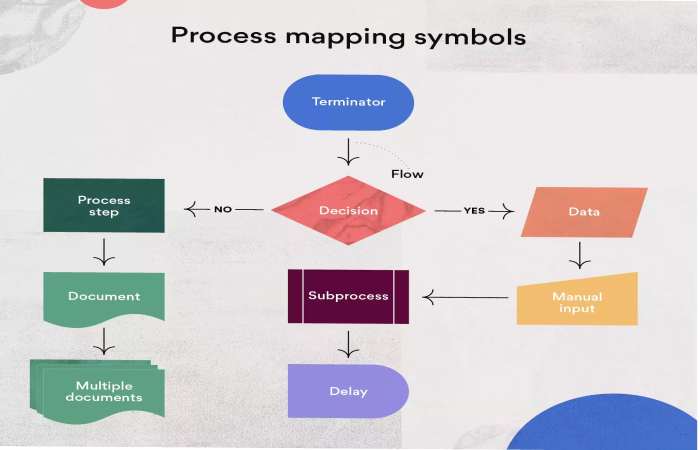
Show the process with symbols or flowchart, including:
Tasks
Decision points
Inputs/outputs
Step 5: Analyze and Optimize
Find the following:
- Delays
Redundancies
Inefficiencies
Process mapping does more than just describe a business process; it helps improve it. Process mapping does more than just describe a business process; it helps improve it. Regular review also makes it easier to identify areas where equipment, systems, or workflows may need attention, especially when businesses follow a structured approach to maintenance planning and process improvement.
Real Life Example (Simple Case Study)
Take for example one process that occurs on a regular basis in the business world: order handling.
- Approach Without Process Mapping
Order is received
Order is handled by someone
Order is shipped
This is easy enough but actually ends up creating chaos.
Process Mapping Approach
Steps Involved:
- Order is placed by customer
Order is entered in system
Inventory is checked
Order is paid for
Order is packed
Order is shipped to the customer
The process is now:
- Clear
Structured
Easy to understand
Case Study: Process Mapping and Business Efficiency Improvement
Background Situation
There was a mid-sized company that had problems with delivery delays.
Problems
- Inconsistent order handling
Lack of clarity regarding roles played by the teams
Communication gaps that led to delays
What They Did
They did process mapping for order handling:
- Clearly defined each step
Allocated responsibilities
Found bottlenecks in the process
Results
Increased efficiency
Fewer mistakes
Improved customer service
Nothing in the process changed dramatically but its understanding did. Nothing in the process changed dramatically but its understanding did.
Types of Process Mapping
Different situations require different types of maps.
1. Flowchart
The most common type.
- Shows steps in sequence
- Uses symbols like arrows and boxes
2. Swimlane Diagram
Organizes tasks by roles or departments.
- Clearly shows responsibility
3. Value Stream Map
Focuses on efficiency and waste reduction.
- Common in manufacturing
4. SIPOC Diagram
Shows:
- Suppliers
- Inputs
- Process
- Outputs
- Customers
Useful for high-level understanding.
Key Benefits of Process Mapping
1. Better Visibility
Everyone understands how work flows.
2. Improved Efficiency
Identifies unnecessary steps.
3. Clear Responsibilities
Each team member knows their role.
4. Faster Training
New employees learn processes quickly.
5. Continuous Improvement
Processes can be reviewed and optimized regularly.
Common Mistakes to Avoid
1. Overcomplicating the Map
Too much detail makes it hard to use.
2. Ignoring Real Workflow
Map what actually happens—not what should happen.
3. Not Updating Regularly
Processes evolve, and maps should too.
4. Skipping Team Input
The people doing the work know it best.
When Should You Use Process Mapping?
Process mapping is especially useful when:
- Processes feel messy or unclear
- Teams are growing
- Errors happen frequently
- You want to improve efficiency
When It’s Not Necessary
You may not need it if:
- Tasks are simple
- Work is done by one person
- Processes rarely change
Tools You Can Use
You don’t need expensive tools to start.
Basic Tools
- Paper and pen
- Excel
- Google Sheets
Advanced Tools
- Diagram software
- Workflow platforms
- Business process tools
Modern tools can automate and update maps in real time. Modern tools can automate and update maps in real time. Businesses can also use productivity software to organize tasks, manage workflows, improve collaboration, and keep process-related information accessible to the right team members.
- The Future of Process Mapping (2026 and Beyond)
- With technological progress, process mapping is becoming more advanced.
- The Future of Process Mapping (2026 and Beyond)
- With technological progress, process mapping is becoming more advanced.
Trends
- Process analysis via AI
Real-time monitoring of workflow
Automation tools integration
Process mining software
Regardless of all the technological improvements, the concept is still simple:
Understand the workflow and optimize it.
Final Thoughts
Process mapping is not about creating charts but understanding the inner workings of the business. When a business owner understands the process flow, he/she can easily:
- Eliminate problems in the workflow
Increase efficiency
Get better results automatically
In most cases, businesses do not have to try harder, they simply have to do things differently.
And process mapping is one of the easiest ways to do it.