


Table of Contents
Ransomware Attacks Explained: How They Work and How to Protect Yourself
In today’s digital world, ransomware attacks have become one of the biggest cybersecurity threats facing individuals and businesses. You’ve probably heard of high-profile cases where hackers lock entire systems and demand payment in cryptocurrency — but what exactly is ransomware, and how can you protect yourself from it?
Let’s break down everything you need to know about ransomware attacks, from how they work to prevention strategies that actually make a difference.
What Is a Ransomware Attack?
A ransomware attack is a type of malicious cyberattack where hackers use malware to lock or encrypt your data and demand a ransom (usually in Bitcoin or another cryptocurrency) to restore access.
Once ransomware infects a device or network, it makes files, applications, or entire systems unusable until the ransom is paid. Even after paying, there’s no guarantee the attackers will unlock your data — which makes these attacks both dangerous and unpredictable.
How Does Ransomware Work?
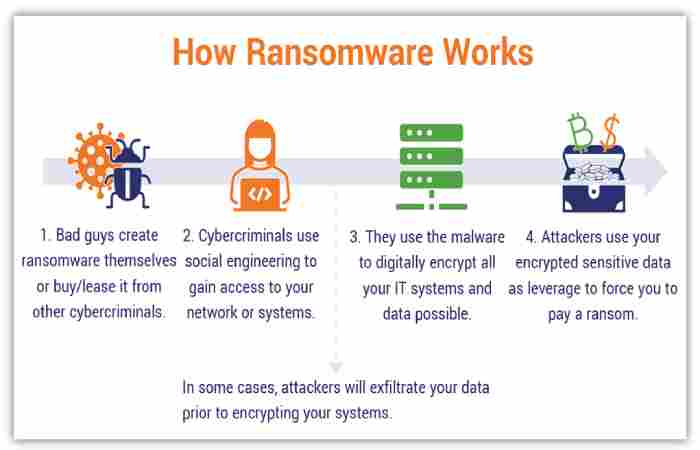
Here’s a step-by-step breakdown of how ransomware typically spreads and attacks a system:
1. Infection Begins (Entry Point)
Ransomware usually enters your system through:
-
Phishing emails (malicious attachments or links)
-
Infected downloads from untrusted websites
-
Compromised software updates
-
Malicious advertisements (malvertising)
-
Remote Desktop Protocol (RDP) vulnerabilities
Once you open an infected file or click a link, the malware installs silently in the background.
2. Encryption Phase
After gaining access, ransomware starts encrypting files — this means turning your data into unreadable code.
It usually targets documents, photos, databases, and system files.
You’ll often see your file extensions change (for example, .locked or .encrypted).
3. Ransom Demand
Once encryption is complete, a ransom note appears on your screen. It usually contains:
-
The ransom amount (often in cryptocurrency)
-
A deadline for payment
-
Instructions on how to pay
-
A warning that your data will be deleted or leaked if you don’t comply
4. The Aftermath
Victims face two options:
-
Pay the ransom (with no guarantee of recovery)
-
Refuse and attempt to recover data through backups or professional decryption tools
Even if you pay, attackers may demand more money or never send the decryption key.
Common Types of Ransomware
Ransomware comes in many forms, but here are the most common ones you should know:
1. Crypto Ransomware
-
Encrypts files and demands payment for decryption.
-
Most common and damaging type.
-
Example: WannaCry, CryptoLocker.
2. Locker Ransomware
-
Locks you out of your device completely.
-
Prevents you from accessing your desktop or apps.
-
Example: Reveton.
3. Scareware
-
Pretends to be an antivirus or security warning.
-
Tricks you into paying for fake “repairs.”
4. Doxware (Leakware)
-
Threatens to publish your private or confidential data if you don’t pay.
5. RaaS (Ransomware-as-a-Service)
-
Hackers “rent out” ransomware kits to others for a share of the ransom.
-
Makes ransomware more accessible to low-skill cybercriminals.
Real-World Examples of Ransomware Attacks
1. WannaCry (2017)
-
Affected over 230,000 computers in 150+ countries.
-
Targeted hospitals, businesses, and government agencies.
-
Exploited a vulnerability in Microsoft Windows.
2. NotPetya (2017)
-
Disguised as ransomware but was actually data-wiping malware.
-
Caused billions in damages, especially in Ukraine and Europe.
3. Colonial Pipeline (2021)
-
A ransomware attack shut down a major US fuel pipeline.
-
The company paid nearly $4.4 million in Bitcoin to regain access.
These examples show how ransomware can affect anyone — from individuals to massive corporations.
How to Detect a Ransomware Attack Early
Early detection can help minimize damage. Watch out for:
-
Unusually slow system performance
-
Locked or missing files
-
Unknown processes running in the background
-
Strange file extensions added to your documents
-
Pop-up ransom messages demanding payment
If you spot any of these signs, disconnect your device from the internet immediately to prevent further spread.
How to Protect Yourself from Ransomware
1. Backup Your Data Regularly
Keep copies of your data in multiple locations:
-
Offline backups (external hard drives)
-
Cloud storage
If ransomware strikes, you can restore your files without paying a dime.
2. Don’t Click Suspicious Links or Attachments
Phishing emails are the #1 cause of infections.
Always double-check sender addresses and avoid opening unexpected attachments.
3. Keep Software Updated
Outdated software often has security holes that hackers exploit.
Enable automatic updates for your operating system, browsers, and antivirus tools.
4. Use Reliable Security Software
Install trusted antivirus and anti-ransomware software that can detect and block threats before they execute.
5. Limit Admin Privileges
Use standard user accounts instead of admin accounts for daily tasks.
This reduces the damage ransomware can do if it infiltrates your system.
6. Enable Email Filters and Firewalls
A strong spam filter can block malicious attachments and phishing attempts before they reach your inbox.
7. Educate Employees (for Businesses)
Train your team on how to recognize phishing attempts and report suspicious activity.
What to Do If You’re Infected
If ransomware strikes, here’s what you should do immediately:
-
Disconnect the infected device from all networks.
-
Do not pay the ransom. It doesn’t guarantee data recovery and encourages more attacks.
-
Use backups to restore your files if available.
-
Scan and remove the ransomware using professional tools or antivirus programs.
-
Contact cybersecurity professionals if the infection is severe.
-
Report the attack to local authorities or cybersecurity agencies (e.g., FBI Internet Crime Complaint Center).
Can You Remove Ransomware Without Paying?
Sometimes, yes.
Security experts and organizations like No More Ransom (nomoreransom.org) provide free decryption tools for certain ransomware variants.
However, these tools don’t work for every type, especially newer or more sophisticated strains.
The Future of Ransomware
Ransomware attacks are becoming more targeted, automated, and professional.
We’re now seeing:
-
AI-powered attacks that adapt to defenses.
-
Double extortion tactics (encrypt + leak threats).
-
Ransomware-as-a-Service (RaaS) ecosystems expanding rapidly.
This means cybersecurity will continue to be a critical investment for both individuals and businesses.
Final Thoughts
A ransomware attack can strike anyone — from casual computer users to Fortune 500 companies. The best defense isn’t paying the ransom but prevention, preparation, and awareness.
Regular backups, updated security tools, and smart online habits can save you from the chaos and cost of an attack.