

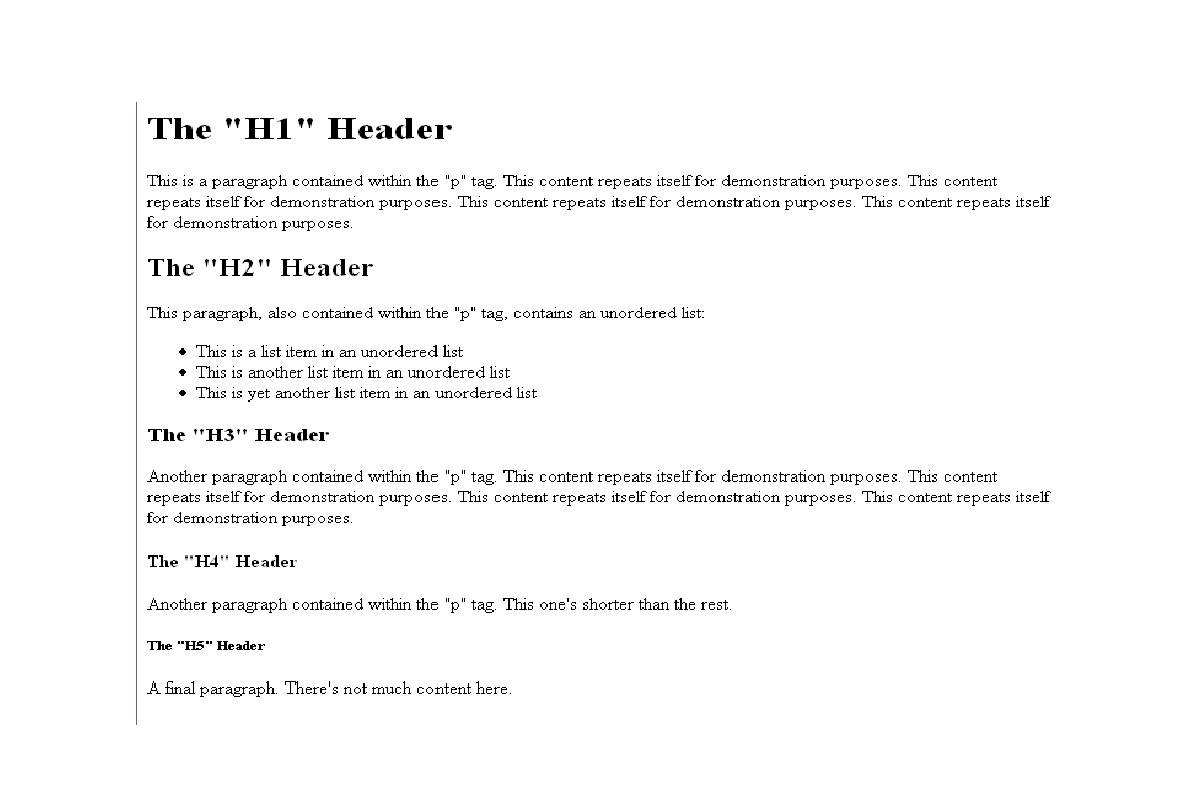
HTML Headers Definition
HTML Headers used to define the page title. Headers define with, where n is a number between 1 and 6 that determines the order of the header.
Headers play a critical role in the HTML structure. An HTML file is a combination of data that establishes the hierarchical structure of the website, where the header is the first step for all other commands.
The HTML file contains only one “H1 header”; however, the others can use more than once.
Each header begins with and must close with and the title content placed in the middle of the two commands.
What are headers for?
The headers organize the structure and establish a hierarchical order in the HTML files, and inform the browser about what data to display.
Headers formatted using CSS files that serve to separate content from formatting.
It is mandatory to use the “headers” so that the texts can be displayed.
Most importantly: An organized and clear structure of HTML files offers benefits not only for the webmaster. But also for users and search engines as they offer essential information to the user about the content and make it easier for them to select what is of interest to you. And also, search engines receive valid source code with relevant keywords that summarize the content.
Understanding Proper Heading Hierarchy
A correct heading hierarchy follows a logical structure.
The typical format is:
-
H1 represents the main topic of the page.
-
H2 divides the content into main sections.
-
H3 breaks those sections into subsections.
Skipping levels (for example jumping from H2 to H4) can confuse search engines and users.
Best Practices for Using HTML Headers
To get the most value from heading tags, follow these modern best practices.
1. Use Only One H1 Per Page
The <h1> tag should represent the main topic of the page.
Example:
Multiple H1 tags can confuse search engines and dilute the page topic.
2. Follow a Logical Structure
Always maintain a clear hierarchy.
Example:
H2: What Is Content Marketing
H2: Benefits of Content Marketing
H3: SEO Benefits
H3: Brand Awareness
This structure helps search engines understand relationships between topics.
3. Use Keywords Naturally
Including important keywords in headings can improve SEO.
Example:
Instead of:
Use:
However, avoid keyword stuffing, which can negatively affect readability and SEO.
4. Write Headings for Humans First
Headings should clearly explain what the section is about.
Good headings:
-
are descriptive
-
are easy to read
-
summarize the section content
5. Do Not Use Headings Only for Styling
Headings should represent structure, not just visual appearance.
If you want large text, use CSS styling, not heading tags.
HTML Headers and Accessibility
Accessibility is an important part of modern web design.
Proper heading structures allow screen readers to:
-
identify sections
-
skip to relevant content
-
navigate complex pages easily
Accessibility guidelines recommend using semantic HTML headings with a clear hierarchy.
This improves usability for people with disabilities and aligns with WCAG accessibility standards.
What is Relevance to SEO?
The headers are essential for search engines since they are used to identify keywords that have a leading role in the content and format of the website.
- Headers usually summarize the content, and therefore it is recommended to use relevant keywords.
- However, using too many keywords should be avoided under all circumstances as this practice is penalized and is called Keyword Stuffing.
- The importance of the header establishes with the numbers, 1 is the most important and 6 the least important. Also, the higher the header is on a page, the more critical it is.
- There are some theories about the impact of keywords in headings regarding positioning.
- Changes made to the H2 header tag rumored to have a greater impact than the others.
- However, the changes that should always make to improve the user experience and usability of the website and not only to improve the positioning.
Modern SEO Tips for Using Headings
To maximize SEO benefits, follow these advanced strategies.
1. Use Headings to Answer Search Intent
Structure content around common questions users search for.
Example:
H2: Why SEO Is Important
H2: How to Improve SEO
2. Optimize for Featured Snippets
Search engines often use headings and lists for featured snippets.
Example:
Follow with a numbered list.
3. Keep Headings Short and Clear
Short headings improve readability and mobile experience.
4. Use Headings to Organize Long Content
Long blog posts should have many structured headings to help readers navigate.
Conclusion
HTML headers are one of the most fundamental elements of web design and SEO. By using heading tags from <h1> to <h6>, developers and content creators can organize content clearly, improve search engine understanding, and enhance user experience.
Proper heading structure also supports accessibility, allowing assistive technologies like screen readers to navigate webpages efficiently.
When used correctly—with logical hierarchy, clear wording, and relevant keywords—HTML headers help create content that is both search-engine friendly and easy for readers to understand.