

Why Are Site Link Extensions Beneficial for Your Business?
Site link extensions allow businesses to enrich their search ads with additional links to relevant web pages of the advertiser’s website. In addition, the extension allows advertisers to redirect visitors not to the same landing page, but to certain parts of the site like products, services, contact information, and special deals. Businesses can also use digital tools such as Acfox to organize business information and support their wider digital operations.
Advantages of Using Relevant Site Links
Relevant use of site links may offer more options for users to get the desired information or take some action. Moreover, they are a good way to make a search ad more eye-catching and provide a better user experience. From the business perspective, site links allow visitors to be redirected to certain parts of the website.
Site Link Extensions Definition
Site Link Extensions are one of the most commonly used ad extensions available in Google AdWords.
These extensions provide advertisers with the ability to promote additional links to your website within a Google Adwords ad.
These extra links normally appear when enabled for the ads that reach the first or second position on the Google search engine results page (SERP).
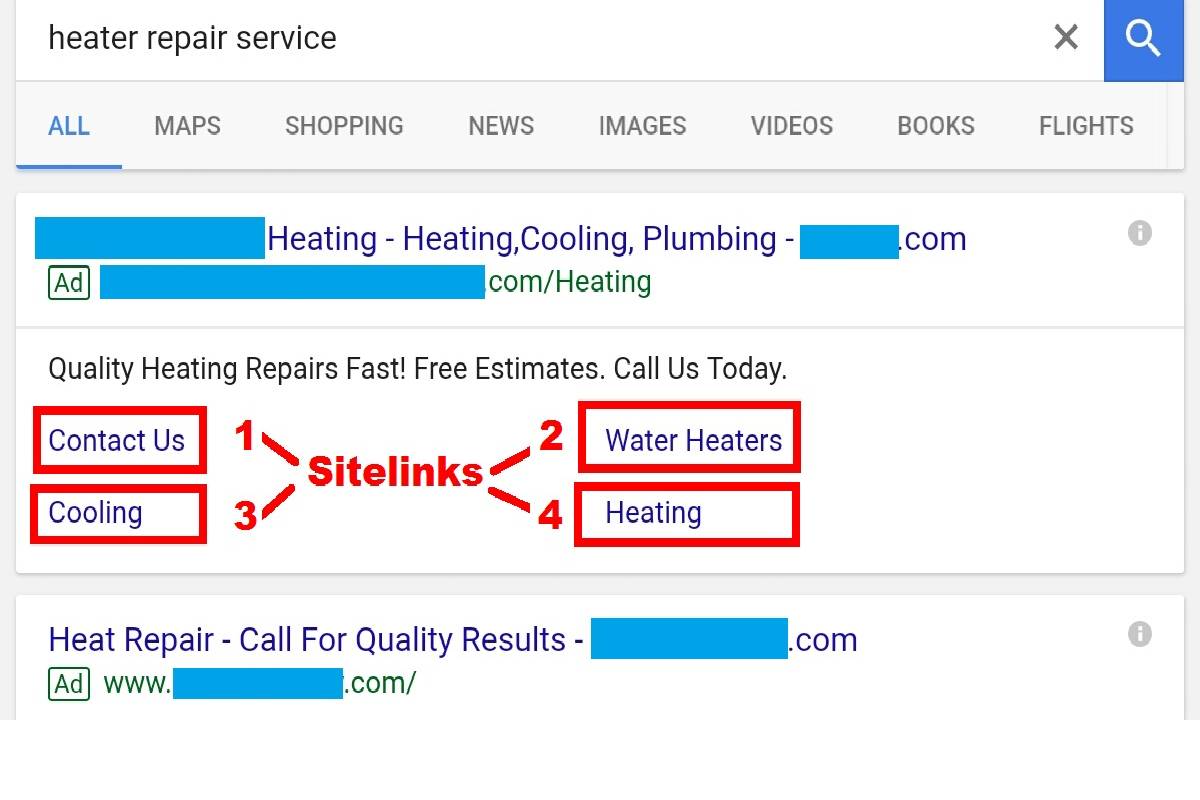
Before delving into this, let’s take a look at how these links show up in the ads.
Typically located below the title lines and the two descriptions, the following example highlights the four site links being used by this particular advertiser with a red box.
What Is A Sitelink Extension?
A sitelink extension, also referred to as sitelink asset on Google Ads, is basically another set of links appearing alongside an advert on the search engine. The links guide people to certain sections on the website of the company, such as products or services, promotions, or even contact information.
The sitelink is unlike the actual link found within the advert since the latter is used to navigate to the landing page chosen for the advert, while the former is just an extra way to navigate to other pages.
Why should advertisers set up site links?
Implementing site links in your Google AdWords campaigns adds significant additional value to your ads. For example, a company offering internet services such as Rise Broadband could use relevant site links to guide potential customers toward service information, plans, or other useful pages.
The three reasons why you need to start using site links:
1. Increase clickthrough rates:
Like other ad extensions, site links allow Adwords ads to take up more space on the SERP. Your ads stand out more and will look better.
In the statistics, we see that ads with site links generate a click rate between 10% – 20% higher than ads without site links.
2. Increase conversion rates:
By providing users with more relevant links and more landing pages that can meet their needs, users have the opportunity to click for faster conversion. When site links implement correctly, we see that conversion rates typically increase. Higher conversions can contribute to stronger revenue and, after operating expenses are considered, may support a business in improving its net profit.
When site links implement correctly, we see that conversion rates typically increase.
3. No change in cost per click:
Regardless of whether to put the site link extension or not, the average cost paid for each click does not change.
How to create the site links?
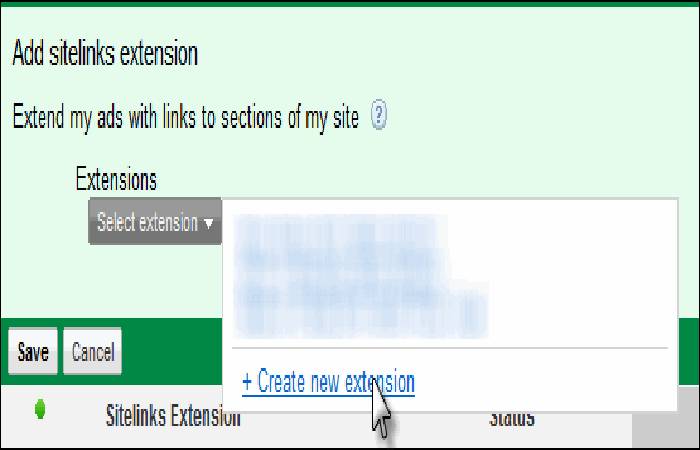
- Site links created within the ad extensions tab of your Google AdWords account. Then look in the view and select site link extensions.
In the “Ad Extensions” tab, click the red “+ Extension” button. - Once you click on the + Extension button, select the campaign where you want to include the extension, you will reach a window like this
How to correctly configure links to sites?
When setting up site link extensions, follow these recommendations.
- Use a unique site link for each landing page or URL; You cannot link two site links to the same page. This approach is also useful for educational websites that organize different resources, such as a WebQuest, into separate pages so visitors can find the information they need more easily.
- The link and landing page must be directly related; Users must identify what they will find when clicking on your link. For an online retailer, for example, a site link could direct visitors to a point-of-sale page or another relevant section that supports the purchasing process.
- Don’t use the same link text for multiple site links. They must be unique texts.
Real Life Business Example
For instance, a virtual clothing shop may create site links as Men’s Clothing, Women’s Clothing, New Arrivals, and Sale Items. Thus, a visitor looking for the brand will be able to find the category according to his/her interests without browsing all pages of the website. The business could also use a video creation platform such as Moovly to create promotional videos for new collections or special offers.
Conclusion
Overall, site link extensions are a good component of search advertisements since they give extra navigation tools and enable visitors to get access to relevant website pages. Site links can help make online advertising effective, clear and convenient when they fit visitors’ search goals.