


AdEspresso Definition
AdEspresso is an incredible tool that allows you to quickly insert several headlines, texts, and images for your ad, automatically creating all possible combinations. Businesses can also use other digital tools such as Acfox to organize business information and support their wider marketing activities.
Without that, it could take a few hours to find out which words sound the best, while AdEspresso does this task in just a few minutes.
In this step, you will also have to fill in the blanks that are just as simple. You will basically have to define the country, regions, language, and cities you want to reach. It is essential that you already know your target market in order to create a successful campaign. Having a clear understanding of the people you want to reach makes audience selection much easier.
When campaigns target customers across different countries, businesses may also need to consider their available global resources when planning their advertising activities.
And finally, based on the results of your campaign, the AdEspresso algorithm will give you suggestions for reducing your PPC, improving your advertising returns by up to 43%.
Knowing all of this, stop wasting money and learn how to structure a campaign on AdEspresso.
Structuring a campaign
- Planning
- Creative and Audience Tests
- Optimization
- Production
For businesses creating detailed campaign guides or educational marketing content, a 1,000-word article can provide enough space to explain these steps, testing methods, and practical examples clearly.
Create a Campaign
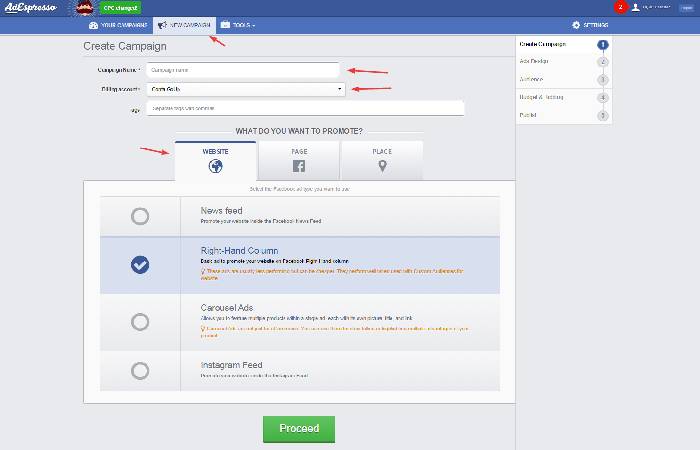
- Fill in the blanks on this page: the name of the campaign, which accounts you want to use.
- Choose what you would like to promote. Among the options are websites, Facebook Pages and applications.
- Select the News Feed and Proceed.
Ads Design
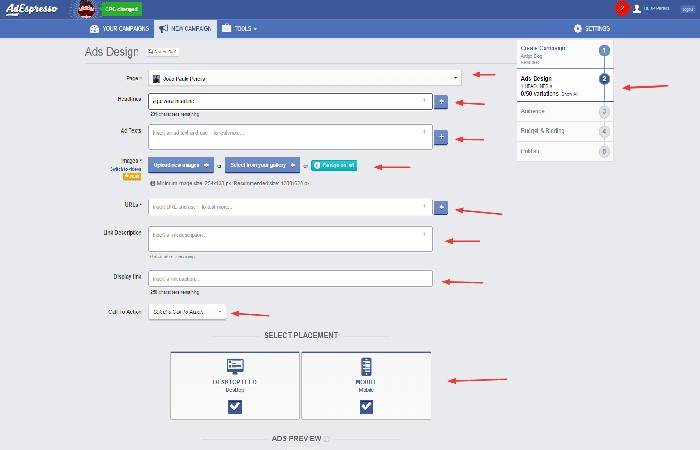
- As before, fill in the blanks.
- In the URLs, you can also test different landing pages.
- Fill in the description link (there is no possibility to add more than one), the Display Link, and select which call to action you want to add.
- Then you can choose whether to work with desktop feed or mobile or both.
- Click on the Proceed button and go to the next screen.
Audience
- In this step, you will also have to fill in the blanks that are just as simple.
- You will basically have to define the country, regions, language, and cities you want to reach.
- It is essential that you already know your audience in order to create a successful campaign.
What do you want to test?
A new page will appear asking what you want to test. AdEspresso will allow you to make a maximum of 250 ads and tests, according to your default settings, gender, age, interests, relationship status and level of education. Keeping campaign information in a central marketing hub can also make it easier to review results and manage different advertising activities.
Budget
In it, you will determine how much you want to spend (Budget), the duration of the campaign and the bid (CPC, CPM).
11 Tips on how to perfect a campaign
I will now pass on 11 tips for perfecting a campaign. The same approach can be used when creating marketing content for specialized products, such as a vacuum leak tester, where reaching the right audience and explaining the product clearly can make a campaign more useful.
- Among the campaigns created in AdEspresso choose the 3 best creatives
- Choose your 3 best segmentations (audience, demographics, etc.)
- Choose your best placements
- Define two conversion pages (landing pages) – perhaps what is hindering the conversion is not your ad, but your conversion page
- Define a Conversion Funnel
- Set up a campaign on AdEspresso
- Set a daily budget that is capable of performing at least one major conversion per day
- Increase the budget for the best conversions
- Decrease the budget for the worst conversions
- Test the bids
- Only pause conversions with negative ROI after exceeding the limit set by you by at least 2 days